RESTws3

About This Space
A demo of how to build and consume Web Services with and without parameters
Last updated on June 10, 2020
Public Permissions: View Open/Fork Run Comment
REST Web Services Template
This template provides an example of how to create REST Web Services in NodeRun. Two Web Services are bundled with this template:
- list.js retrieves a customer list from a database table
- getCustomer.js retrieves information about a specific customer
Web Services URI
The URI format for the Web Services is:
https://noderun.com/run/[your profile]/[your space name]/[route]/[params]
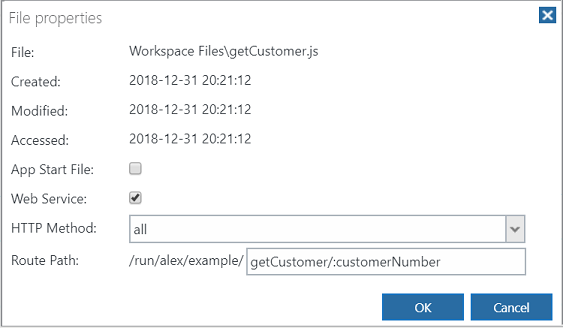
Before you can run the Web Service, you must create a NodeRun profile and publish a space. The route and params are defined by right-clicking the Node.js file in the Files tree and selecting Properties.
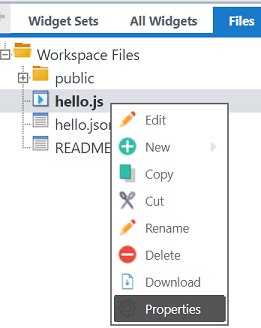
In the Properties window, you can mark a file as a Web Service, and specify the HTTP Method and Route Path.
Testing
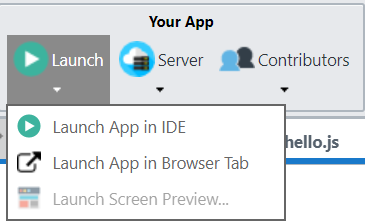
This template provides a Node.js module and interface to test the Web Services. Simply select the Launch App option to run the test.
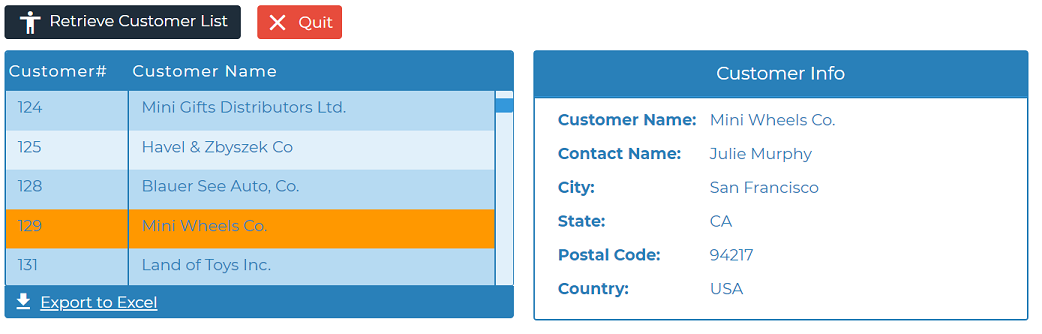
The test uses server-side requests to communicate with the services; however, client-side AJAX requests would work just as well. You can try testing the Web Services using client-side requests by navigating to the appropriate URL in your browser or by using a tool like Postman.
Request and Response Objects
The web server used for NodeRun is Profound.js, which is a superset of Express. Express provides various capabilities for receiving input and sending output using special Request and Response objects. You can refer to the Express API reference for the various properties and methods provided by these objects.
exports.default
NodeRun expects that your Node.js file exports a property named 'default' or 'run', which must point to the main function to execute when the module is called.
API
- pjs.query() - Execute an SQL query
- pjs.sendRequest() - Send request to a Web Service
- display.grid.replaceRecords() - Clear and add records to a Rich Display Grid
More Spaces By TienNguyen (@tien.nguyen)
23350
0
0
24308
0
0
24841
0
0
24060
0
0
Be the first to comment:
Comments