
To Do List Backup

Alex (@alex)

45216

0

0

About This Space

No description provided.


Last updated on September 25, 2019

Public Permissions:   View   Open/Fork   Run   Comment  

Project Title

Your workspace is empty.

To add new files, select a file type from the New menu.
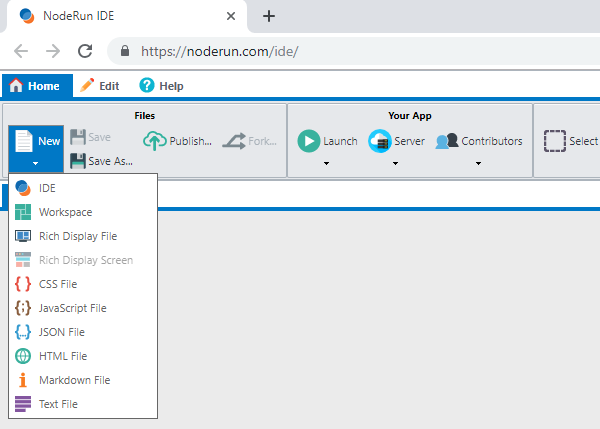
New Menu

To start the Visual Designer, select New -> Rich Display File.


To edit this README file, expand the panel on the left and update the markdown text.
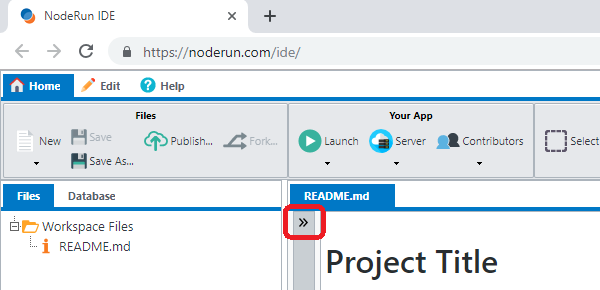
How to expand markdown

Be the first to comment:      

Comments

Write Preview Markdown: bold italic code link
Post

More Spaces By Alex (@alex)

Filters:

Popular Recent

Login System

71499

0

0

Leet Translator

69824

0

2

The Customer Lookup App shows integration between Rich Displays and React.js

69761

0

3

Custom waitlist system with multiple locations/resources

69513

0

4

Want to allow your users to sort data using drag-and-drop? This space shows you how!

69307

1

5

A chess app where people can play against each other online.

69253

2

5

This space shows you how to run multiple queries simultaneously by using Promise.all().

68934

0

1

Vue.js using Rich Display Components built in the Visual Designer

68417

0

2

RPG Application that allows you to work with Insurance Claims converted to Node.js to run in the cloud, using any database

68417

0

2

68313

2

2

This is a NodeRun demo space for a Payments applications

67107

0

0