Dynamic EJS List

About This Space
Displaying information in grids is fundamental to developing applications. This demo application displays a list of products in a grid.
Last updated on April 21, 2019
Public Permissions: View Open/Fork Run Comment
Dynamic EJS List Template
This template illustrates how to use EJS to display information from a database.
What is EJS?
EJS is a simple templating language that lets you generate HTML markup using dynamic data from a Node.js script. For more information, visit http://ejs.co.
Setup
Generally, you will need 2 files to implement EJS:
- An EJS file for the HTML template (list.ejs)
- A Node.js file to produce the data for the ejs template (list.js).
response.render() connects the Node.js code to the EJS file. For example:
function list(request, response) {
  var customers = pjs.query("SELECT customerName FROM customers");
  response.render("list.ejs", { customers });
}

exports.run = list;
The Node.js file must be setup as an Express route:
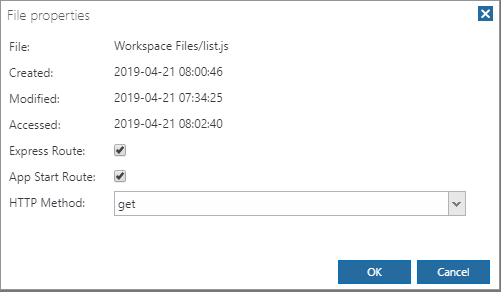
To get to this dialog, right-click the file in the Files tree and select Properties.




Be the first to comment:
Comments